
MyAviator, OpenText | 2024.07 - 2025.06
An AI assistant that turns document-heavy work into instant summaries, PII detection, translations, and podcasts.
Team: 1 Product Designer,
3 PMs, 12 Engineers
My Role: Research,
Design & Prototyping
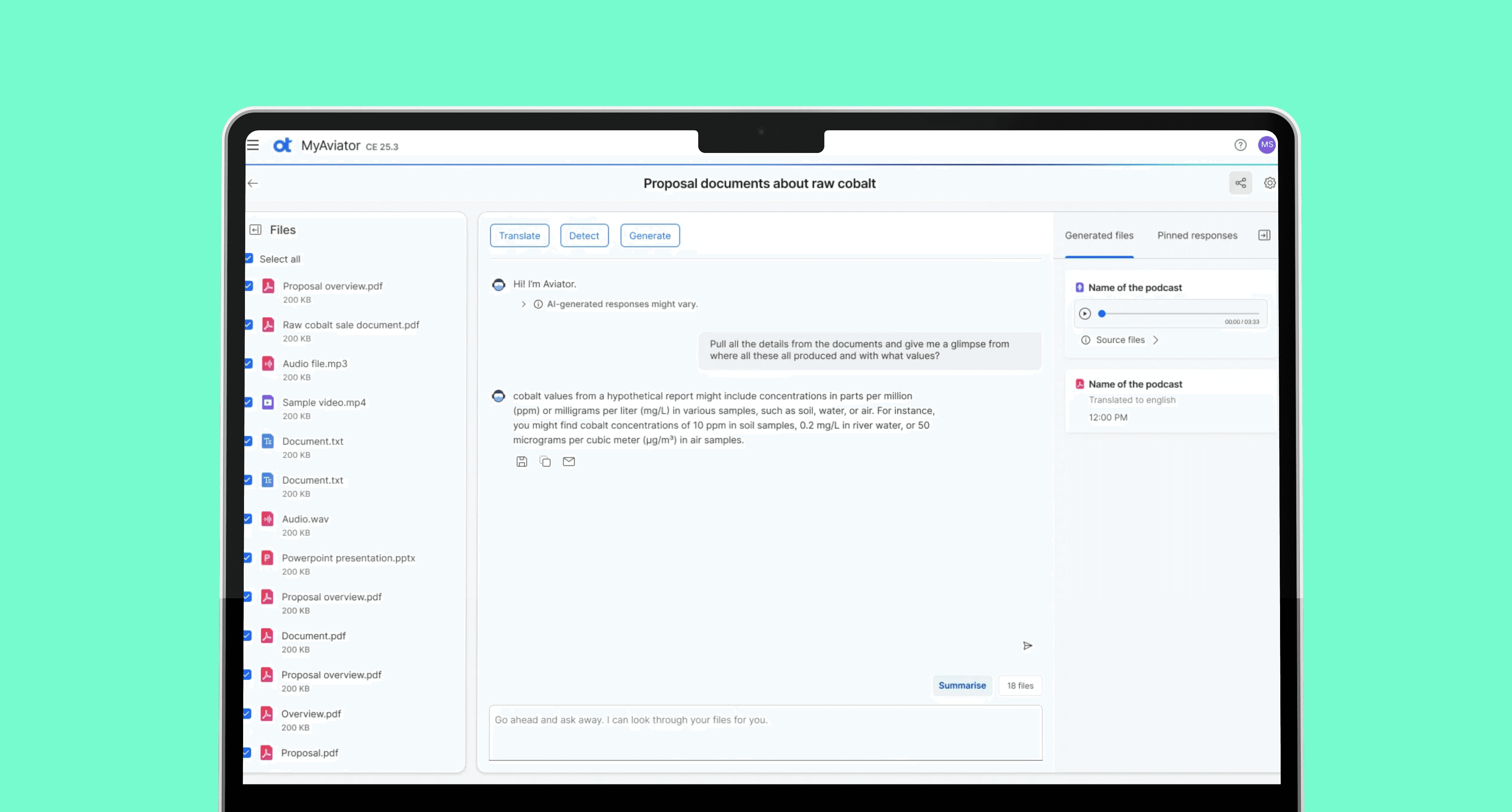
I led the UX for MyAviator at OpenText, a single place where users upload documents, analyze them with AI, and act on the results without switching tools. I took it from the first workflow sketches to MVP launch. That meant the core of it: the Space model, the file interactions, and the AI actions behind summarization, PII detection, translation, and podcasts.
Key metrics post launch
Daily active users
250+
Total documents processed in first month
18,500+
AI actions triggered
42,000+
User Satisfaction rating
4.6/5
— Context
What is MyAviator?
MyAviator is a standalone AI assistant at OpenText, built for enterprise teams who live in documents: HR, support, compliance. Instead of moving a file between a summarizer, a translator, and a redaction tool, they do all of it in one workspace, with answers grounded in the files they uploaded.
— Opportunity
Documents were everywhere. AI was not.
Enterprise users dealt with huge volumes of documents every day, but the AI that could help was locked inside individual products. There was nowhere to upload a set of files, pull them together, and act on them in one place. So people bounced between tools, redid the same steps, and read everything by hand. It was slow.
Signals from internal discussions and product reviews showed
80%
Users switch between 3 or more tools to complete a single document task.
65%+
of daily tasks involved document review or analysis
— Research results & insights
What users told us
From 40 survey responses and follow-up conversations with HR and Support teams, a few patterns kept showing up.
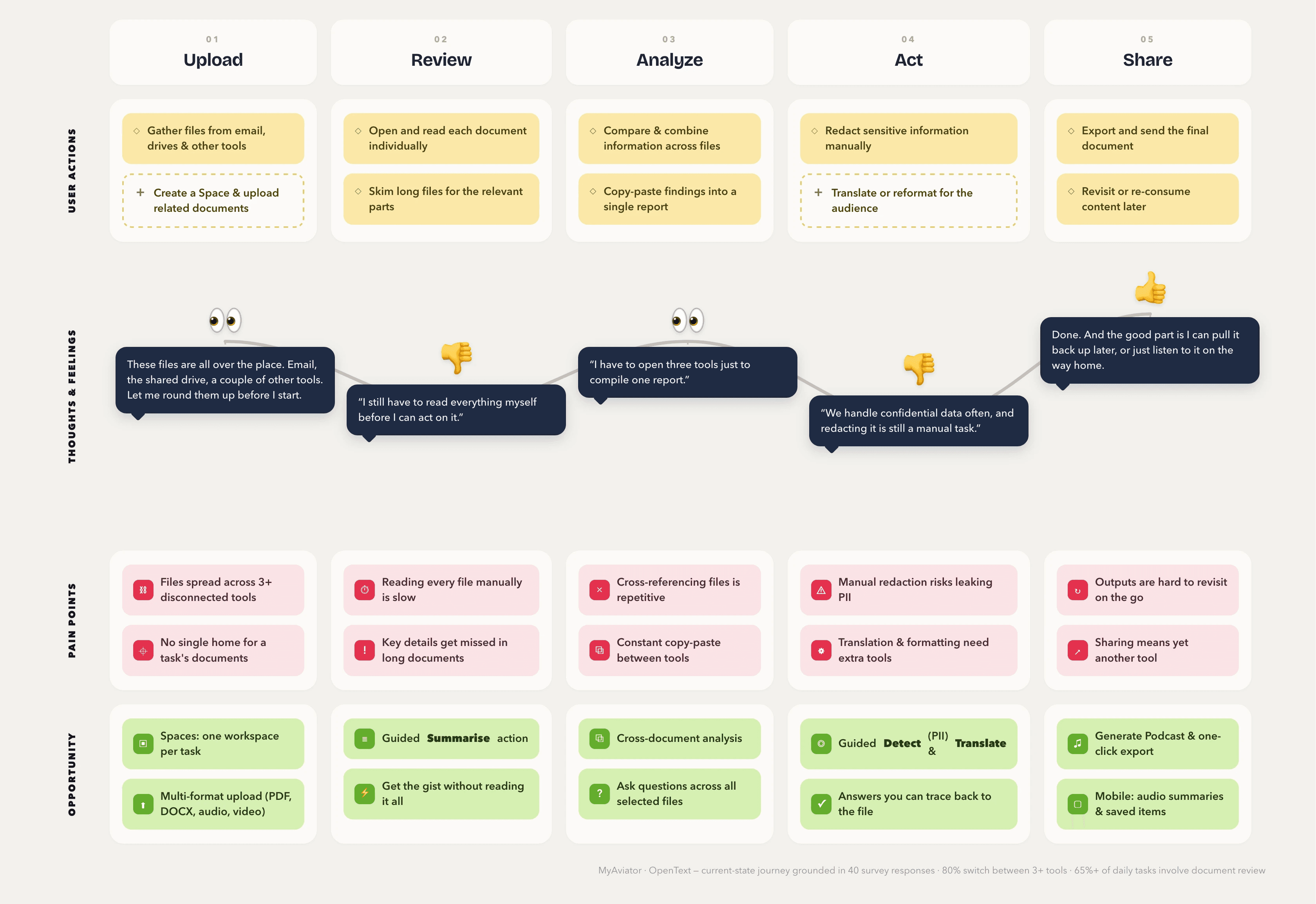
“I have to open three tools just to compile one report.”
1. Document work spans multiple tools
Users jump between platforms to review, summarize, redact, and share one set of files. Nowhere lets them finish the job in a single place.
2. Early stage document review is manual
Before they can decide anything, people read through several files and stitch the information together themselves. Slow, and a lot of copying and reformatting.
“I still have to read everything myself before I can act on it.”
3. Sensitive data handling is a manual step
These teams deal with confidential documents constantly, but redaction and compliance checks still happen by hand.
“We handle confidential data often, and redacting it is still a manual task.”
— HMW Statement
How might we create a single workspace where users can upload multiple documents, extract insights, and perform actions without switching between tools?
— User Journey
Mapping the document workflow with MyAviator
I mapped the end to end document workflow to understand how users upload, review, summarize, redact, and share files. This helped us identify where manual effort and tool switching slowed them down.
— Scoping
Where we chose to focus
The workflow and the research pointed at the same two stages, so that's where we put MyAviator.
Review Stage
How might we help users quickly understand large sets of documents without manually reading everything?
Action Stage
How might we make it effortless for users to summarize, redact, translate, and export documents in one place?
Why didn’t we build it as a general AI chatbot? Users are familiar with conversational AI. So why not make MyAviator fully open ended?
From a product perspective
Users were working with documents, not looking for a chatbot. We wanted to help them complete common tasks faster instead of starting every interaction from scratch.
From a user perspective
Users already knew which documents they wanted to work with. They wanted quick actions like summarizing, translating, or finding information without long back-and-forth conversations.
— Solution #1 - Guided Actions
Improving first-try output quality
When people asked open-ended questions across several documents, the answers were all over the place. So instead of making them engineer the perfect prompt, I gave them set actions for the common jobs: summarize, detect sensitive data, translate, generate a podcast. Pick the action, get a reliable answer on the first try.
— Solution #2 - Spaces
Creating context before action
Working across a lot of files, people kept losing context, and results shifted depending on what happened to be selected. So I built Spaces: a focused place where you gather related documents and run actions on just those files. Each Space holds its own context, so the answers stay grounded in the set you actually care about.
— Solution #3 - Multi File Intelligence
Understanding documents together
People were comparing information across files in their heads, one document open while scrolling another. I let them run a single action across several selected files at once, so the tool does the pulling-together instead of the person. No more copying findings into a separate doc just to make sense of them.
— Solution #4 - Mobile Version
Designed for on the go use
On mobile, people behaved completely differently. Nobody uploads files or sets up Spaces on a phone, they listen to outputs on their commute. So the mobile experience leans into exactly that: audio summaries and saved content, ready to play. The point was to make MyAviator useful even when you're nowhere near your desk.
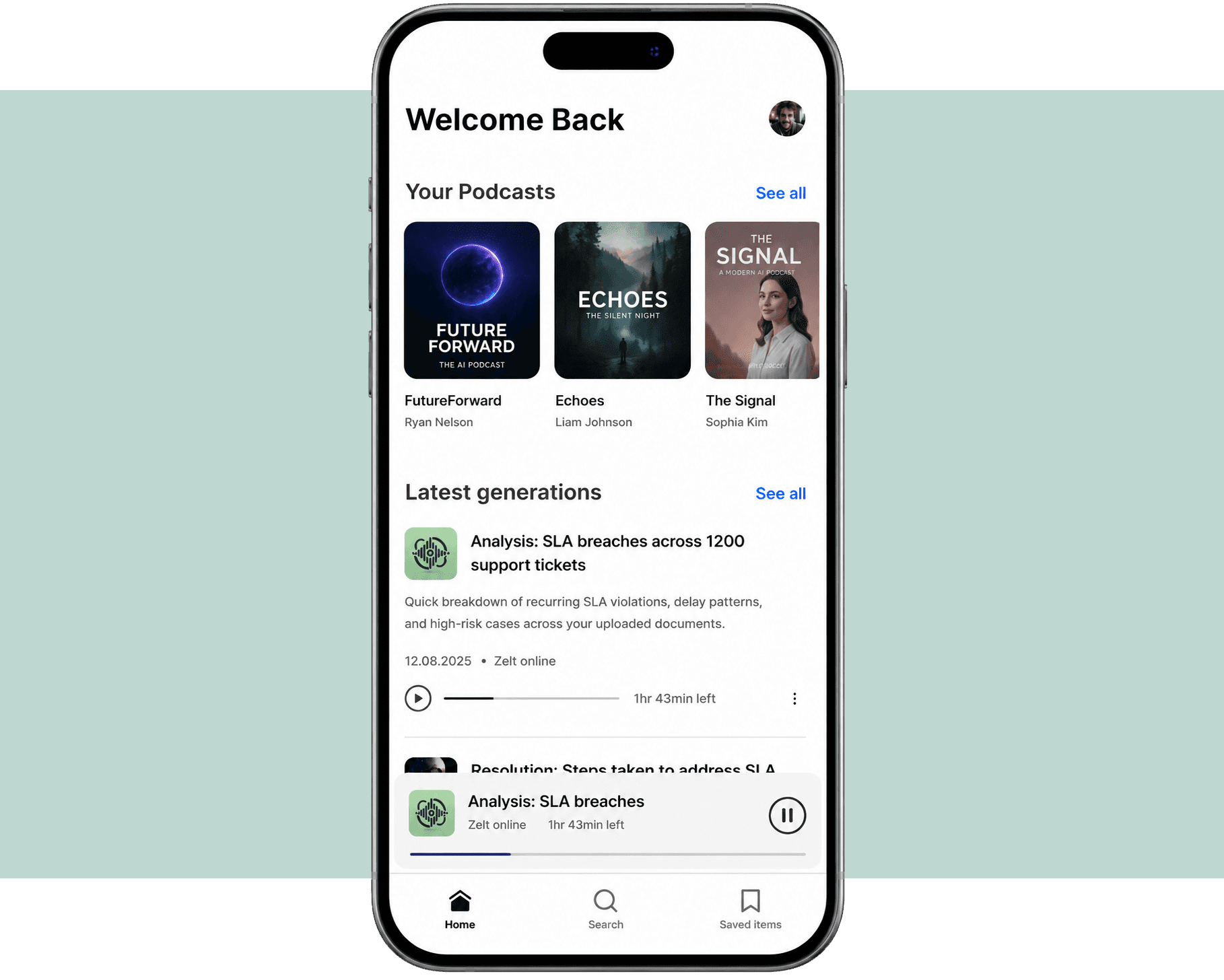
Mobile is built for consumption, not creation.
Users can instantly listen to insights or revisit saved items. no setup needed.
Optimized for quick sessions.
Open → Resume → Listen.
No heavy workflows, no distractions.
— Reflection
What I learned from this project
MyAviator taught me what it actually takes to build AI inside enterprise constraints. Accuracy, privacy, and reliability aren't things you bolt on later. Every decision sat between what users wanted and what the system could honestly deliver.
The other lesson: lock scope early and stay close to engineering, so you don't end up promising AI magic you can't ship.
✅ What went well:
Clarified complex document workflows early, reducing scope debates and stakeholder misalignment
Maintained close collaboration with product and engineering throughout evolving scope discussions
⚠️ What could be improved:
Overestimated AI capability in early exploration. A title suggestion feature produced low relevance results and was removed after validation.
Did not prioritize onboarding early enough, which impacted first time user clarity and feature adoption.